Thanks for diving into this post!
I’ve been working on a music engraving solution in my free time for around two years now. It was driven by a mixture of curiosity and wanting to solve an actual challenge I’d faced as a pianist - how to rapidly and efficiently improve my sight reading skills.
Sight reading, i.e. picking up a piece of music you’ve never seen before and playing it, is one of the most demanding skills to develop as a pianist. It requires visual parsing, structural understanding and physical coordination (hands) all working together at the same time.
Whilst the structural understanding bit (music theory, harmony etc.) genuinely requires years of training and experience, developing the visual parsing and coordination skills seems amenable to some sort of automated, digital teaching aid. I decided, why don’t I just build something that allows me to drill this skill over and over again, in a mind-numbing loop until I make no mistakes. Throw in spaced repetition and we can drastically reduce the amount of time needed to rewire the brain to effortlessly handle the more mechanical aspects of sight reading.
If you want to know more about the overall solution I built (hint: it’s an app), you can see a summary of it here. The rest of this blog post is concerned with how I actually built the music engraving system that underpins it.
As an aside, the text in this article is all written by me, with no AI involvement. I did however use AI to help construct the diagram of the rendering pipeline later in this article. The engraving engine and app were written by hand for the first year of development, but since around November last year, the entirety of ongoing development has been carried out using Claude Code. I'm mostly just calling this out for transparency, as people are understandably sensitive about human vs. AI provenance these days.
Note: I’ve tried to write this so it can be followed by someone with limited knowledge of music. I’ve included definitions for some musical jargon which you can see by clicking on highlighted words.
Music engraving is the science/art of faithfully representing music in written form (is there a word for things that are both a science and an art?). Its fundamental purpose is to transfer the composer’s intent onto a piece of paper, which at a minimum requires encoding the two main degrees of freedom: pitch (how high or low a note sounds) and . There are of course other dimensions, such as and , but pitch and duration are the absolute non-negotiables. You could omit articulation and dynamics, and a piece would still be recognizable.
The whole history of music engraving is fascinating, but the TLDR is that we’ve converged on a set of widely observed best practices for representing music in written form. There is no ISO standard that I’m aware of, but there are several reference books that provide detailed guidance on how to construct legible music.
The foremost among these (and in my opinion, one of the best technical books I’ve ever read) is Behind Bars by Elaine Gould. It’s a 700+ page guide that systematically covers each aspect of modern musical engraving. It starts with how to draw a single note, i.e. represent a pitch, then layers concepts on top of that. The thing I really like about this book is it revolves around visual examples rather than simply declaring rules.

Example of guidance provided in Behind Bars
/**
 * Horizontal space for a note of [durationTicks], relative to a
 * [quarterNoteTicks]-long quarter note.
 */
fun spaceFor(durationTicks: Int, quarterNoteTicks: Int): Float {
    if (durationTicks <= 0) return 0f
    val ratio = durationTicks.toFloat() / quarterNoteTicks

    // Assuming 480 ticks per quarter note:
    // eighth   (240)  -> 1.32   (linear would give 1.00)
    // quarter  (480)  -> 2.00   (linear would give 2.00)
    // half     (960)  -> 3.03   (linear would give 4.00)
    // whole   (1920)  -> 4.59   (linear would give 8.00)
    return maxOf(MIN_PADDING, BASE_SPACE * ratio.pow(SPACING_EXPONENT))
}
Converting the rule into code
I used this book as a reference throughout the project. There’s actually a ton of non-obvious rules that, if they weren’t followed, would lead to ‘uncanny valley’ sheet music that just doesn’t look quite right to an experienced musician. I’ve a separate article coming soon titled “falsehoods programmers believe about music notation” that will expand on this.
For now, here’s an example of a specific rule that should be followed when writing music notation.
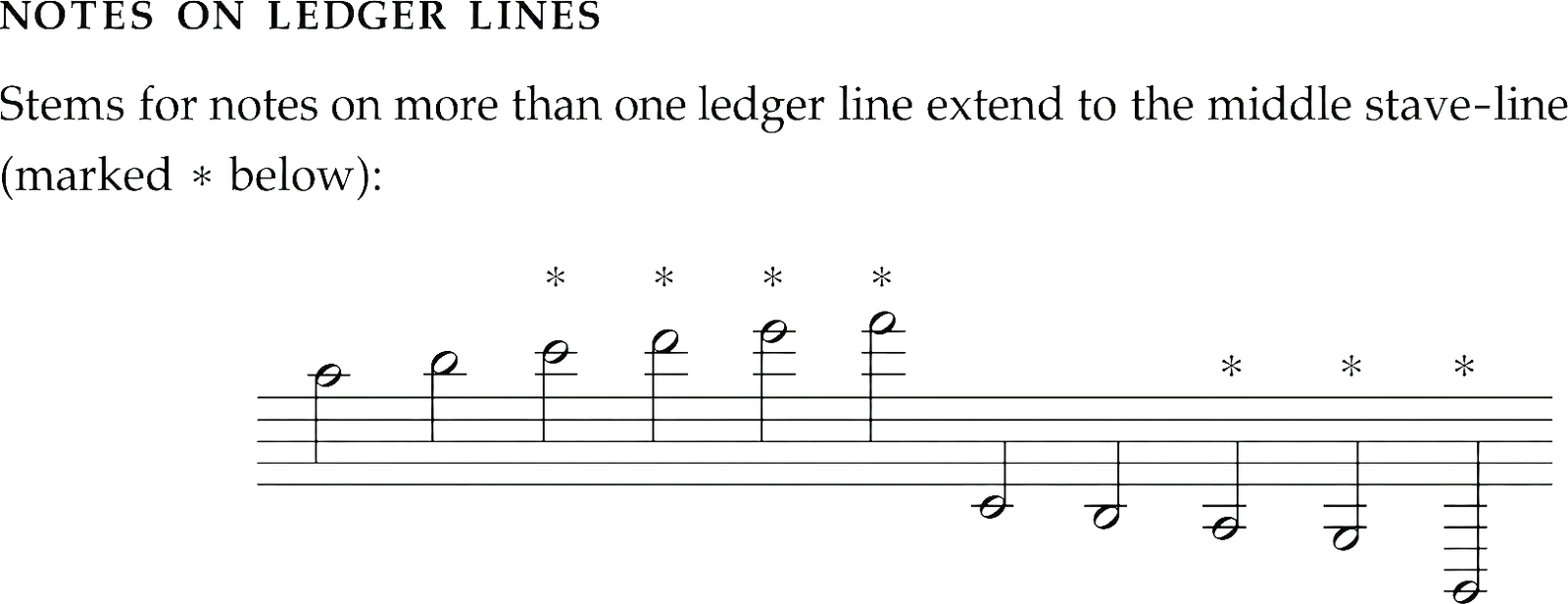
Just one of the many rules for determining length
Optional: spot the errorEach question shows the same music engraved twice. One follows the rule from Behind Bars, the other breaks it. See if you can spot the correct one.
These notes sit on more than one ledger line above the staff. Which engraving draws the stems correctly?
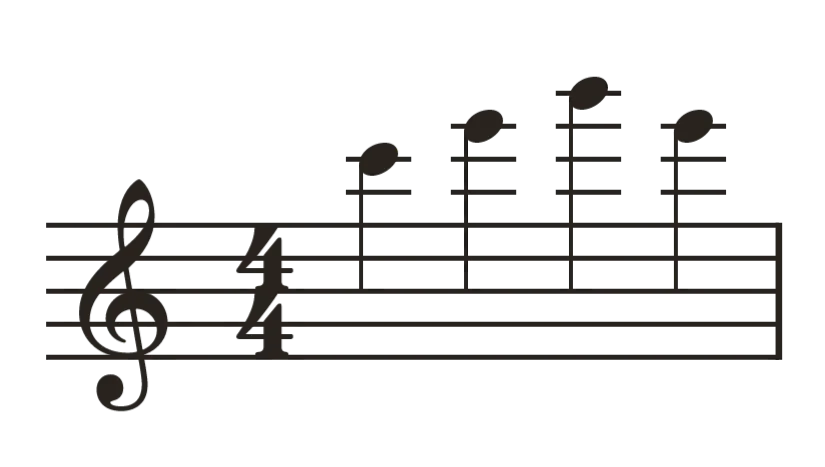
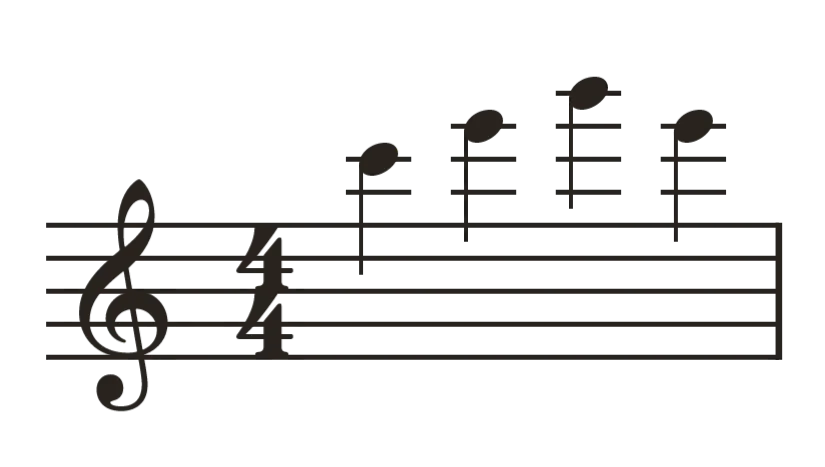
A is correct. Once a note sits on more than one ledger line, its stem is extended all the way back to the middle line of the staff. B uses the standard one-octave stem, which leaves the notes visually adrift from the staff they belong to.
Which engraving points the stems in the right direction?
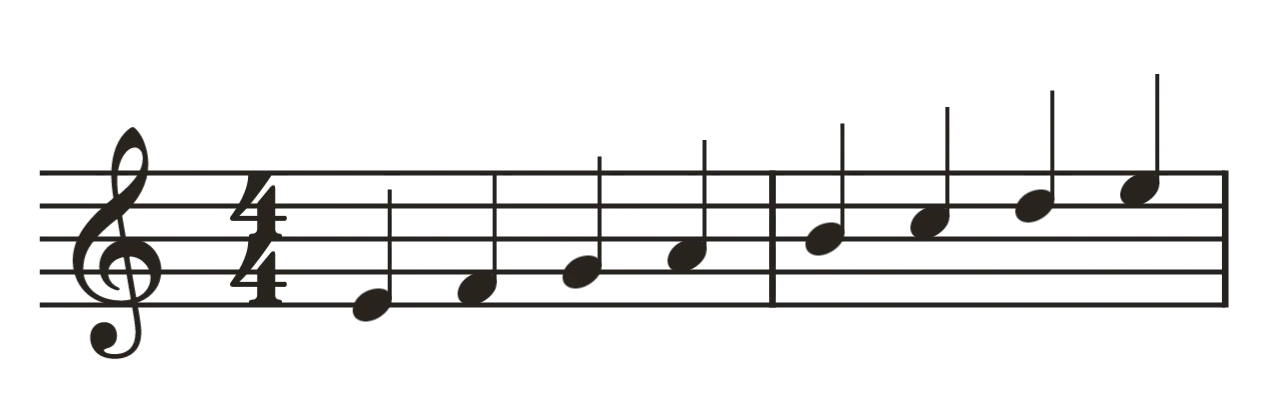
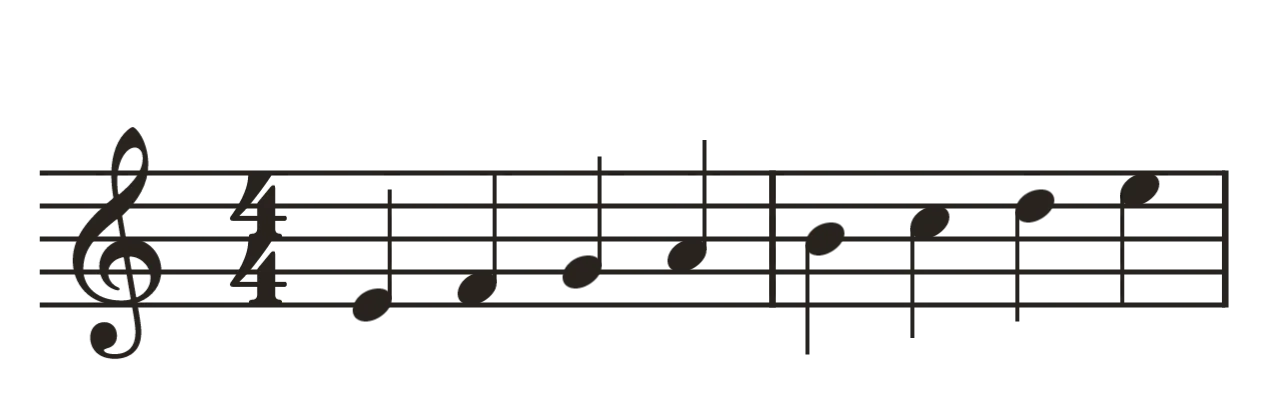
B is correct. Stem direction follows the note's position relative to the middle line: notes above it take stems pointing down, notes below it take stems pointing up. A keeps every stem pointing the same way, so the ones above the middle line run off the top of the staff.
Both bars last the same amount of time: one long note in the first, four shorter ones in the second. Which engraving spaces the notes correctly?
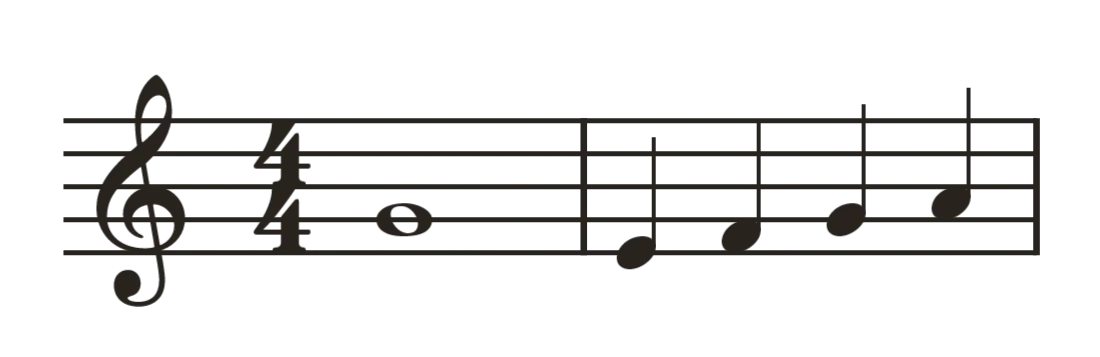
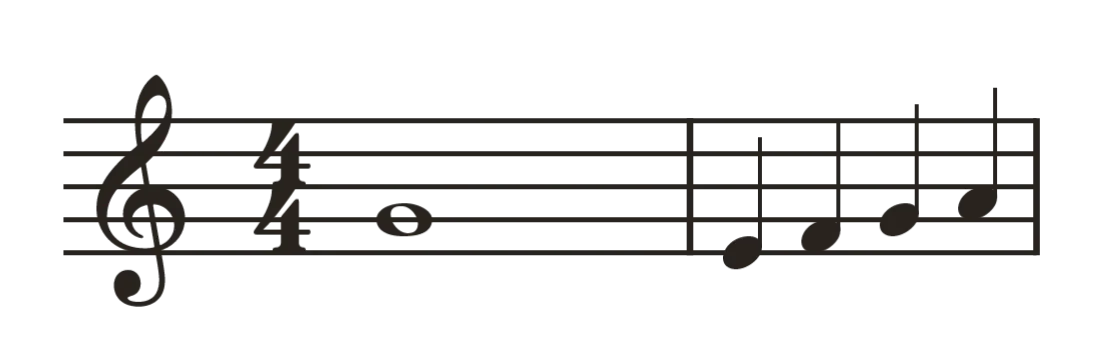
A is correct. Longer notes get more room, but not in strict proportion to how long they last, so the whole note's bar comes out narrower than the bar of quarter notes. B spaces every note in exact proportion to its length, which leaves the whole note alone in a wide, empty bar and squeezes the quarter notes together.
When I started exploring this problem I hacked together a basic prototype in a few hundred lines of canvas code. It was pretty satisfying to see actual musical notation appear on the screen, but this early attempt suffered from poor performance and spaghettification, especially as I added more and more notation types whilst mixing musical engraving logic with low level drawing commands given to the canvas.
You might ask why I didn’t use an existing library for this. Whilst there are some solutions out there e.g. Verovio, none of these fitted my unique requirements, in particular the ‘infinite scroll’ requirement. I also just wanted a challenge.
Ready to chuck out my ‘built in a day’ prototype, I decided a proper solution would need to have the following:
- Decoupled engraving (layout) and rendering: this would improve performance since engraving could be done when needed, rather than 60 times per second. It would also nicely decouple these two complex parts of the codebase
- Renderables: abstraction for all notational elements. These have bounding boxes and coordinates. There are
RenderableChord,RenderableAccidental,RenderableBeam,RenderableClefSymbol,RenderableRest, and so on. This is the output of engraving and the input for rendering. This allows the renderer to be dumb i.e. not need to know about the rules of music engraving, just how to draw individual glyphs at specified locations - Progressive engraving: since most exercises are ‘infinite’, we need to be able to generate new content on demand
- Ability to overlay annotations (e.g. for highlighting wrong notes). It should also be possible to overlay non-canvas elements, and anchor them somewhere on the score. I use these throughout the app, in particular in the theory lessons, where I need to be able to point out and label various bits of notation
The following diagram explains the overall architecture, i.e. how we go from input music, to output score graphics. After that, I’ll go into a bit more detail on how the layout phase works.

Drawing the pipeline: musical data goes in, Renderables come out of the layout phase, and the drawing phase maps them onto screen pixels.
Two phase approach that decouples layout from rendering
There are two main ways you can tackle the layout process. The first (simplest) is an imperative approach. This proceeds step by step, which I’ve given a high level summary of below. There’s a second, more sophisticated, constraint based approach to engraving which fully fledged engraving software uses (e.g. Dorico). The ‘optional reading’ block explains it a bit.
Optional reading: the constraint-based approach
The constraint based approach revolves around a system of elements, where elements interact via 'springs and rods'. Hard constraints, e.g. that accidentals must not be so close to a notehead that they overlap, enforce minimum spacing requirements (rods). More flexible variables, e.g. spacing between two chords, are the springs. The entire system can then be assigned an energy function - springs that deviate more from their resting length have more potential energy. By minimizing the energy function we can obtain the most 'acceptable' layout according to our relative priorities. Constraints can be made higher priority by simply increasing the stiffness of their respective springs.
I ultimately chose to start with the imperative approach. It’s simpler to implement, and for the initial feature set I wanted to support, it’s actually more than adequate. Here’s a summary of how it works:
- State setup: tracks current position (
domainX/domainY), active , , and per-measure accidentals (reset each so an accidental only shows once per bar) - Measure boundaries:
startMeasure/endMeasuresnapshot the start X, reset measure-local accidentals to the key signature, and emit aRenderableMeasurewith the bar width - Clef & key signature:
engraveClefplaces the clef glyph;engraveKeySignaturelays out sharps/flats in order, bumping certain accidentals up an octave to conform to the standard key signature layout - Time signature:
engraveTimeSignatureadds margins and emits the numerator/denominator glyph - Chord engraving: for each : compute pitches/notes, decide stem direction from average pitch vs. clef’s middle line, determine which sit on the opposite side of the stem (cluster collisions), and compute leftward accidental offsets (stacking to avoid collisions)
- Note heads, ledger lines, accidentals: For each pitch, compute vertical offset, generate s above/below the as needed, attach an renderable if required, and update the measure’s accidental memory
- Stem & flags: Calculate stem length. Shorten progressively for notes far from the middle line. Extend to the middle line for notes well off-staff. Determine flag count (number of tails on the stem) from
NoteDuration - Rests:
engraveRestemits aRenderableRestand advances by its width plus standard spacing - Octave modifiers:
detectOctaveModifiers/engraveChordWithOctaveModifiersshifts chords ±1 octave when they exceed thresholds, so they render under an label rather than absurdly far from the staff - Measurement mode:
measureChordengraves into a snapshot of state then restores it, letting callers query a chord’s footprint without committing it. A measure pass is done to allow alignment between the left and right hand measures
Once this is done, we end up with a load of Renderables, which we then pass to the ScoreRenderer class. This simply iterates through them and draws them on the canvas. I did however need to make one optimisation here. Since the sight reading exercises are ‘infinite’, we end up with an unbounded number of Renderables, which accumulate as the exercise goes on. The simple solution here is to use their coordinate positions and bounding boxes to do a culling check. The culling check is extremely fast, even for a large number of Renderables, and keeps the draw time consistently under 16ms, even in very lengthy sessions.
I mostly developed the engraver and renderer in parallel, however I wanted to be able to unit test the engraver in isolation without relying on the rest of the rendering pipeline. This would make it easier to identify if regressions were happening upstream in the engraver or downstream at rendering time. I came up with a pretty good approach for this. Due to the nature of the ASCII fixtures, it’s self documenting too.
@Test
fun cDiminished7th_inKeyOfCMajor() {
    val result = engraver.engraveChord(
        PitchedChord(ChordTypes.DIMINISHED_SEVENTH, Note.C, Octave.FOUR)
    )

    assertNotes(result) {
        """
        |-----|
        |     |
        |-----|
        |     |
        |bb0--|
        |     |
        |-b0--|
        |     |
        |-b0--|

          -0-
        """
    }
}
This approach isn’t suitable for testing every single behavior, but provides a quick and easy way to test some core engraving paths in a way that isn’t brittle (e.g. versus testing exact renderable coordinates), and doesn’t rely on the downstream renderer at all.
Rendering
Drawing the score is relatively straightforward once you have the engraver emitting Renderables. It’s essentially just a matter of iterating through them and drawing them in the specified location.
Some of the glyphs are pretty easy to draw procedurally, e.g. rectangular markers. However, for other things like the treble clef glyph, I leant heavily on publicly available content on Wikipedia. Unfortunately, many of these were stylistically inconsistent with each other and some glyphs simply weren’t available at all.
I later found out about the Bravura font created by Steinberg (for their Dorico software). They’ve actually made this freely available to use under the SIL Open Font Licence, so I switched to this pretty quickly. I can’t overstate my gratitude for this project - it has saved me considerable amounts of time and significantly improved the overall visual quality of the engraving pipeline. The Bravura glyphs use a coordinate scale that is consistent and aligned to musical notation scales, specifically the SMuFL standard, where 1 em = 4 staff spaces, so there’s no guesswork involved in scaling individual glyphs. Previously, I had to apply scaling fudge factors to each glyph when first importing.
For testing the full E2E pipeline, screenshot testing is the only way to go. Whilst the test code is clear, it’s helpful to be able to grasp the context of the test from the screenshot output itself. To achieve this, I actually embedded some additional metadata in the screenshot output. The goldens then serve a dual purpose: a tripwire for visual regressions and visual documentation of the engraver requirements and capabilities.
The screenshot harness also handles some tedious stuff for me like centering and scaling the engraver output so it fits nicely inside the content box.
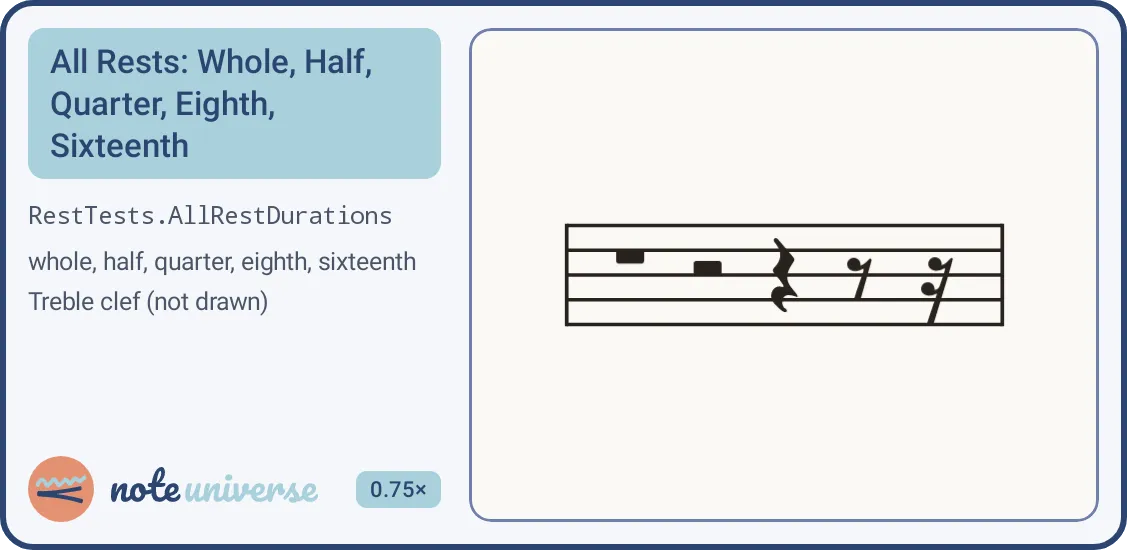
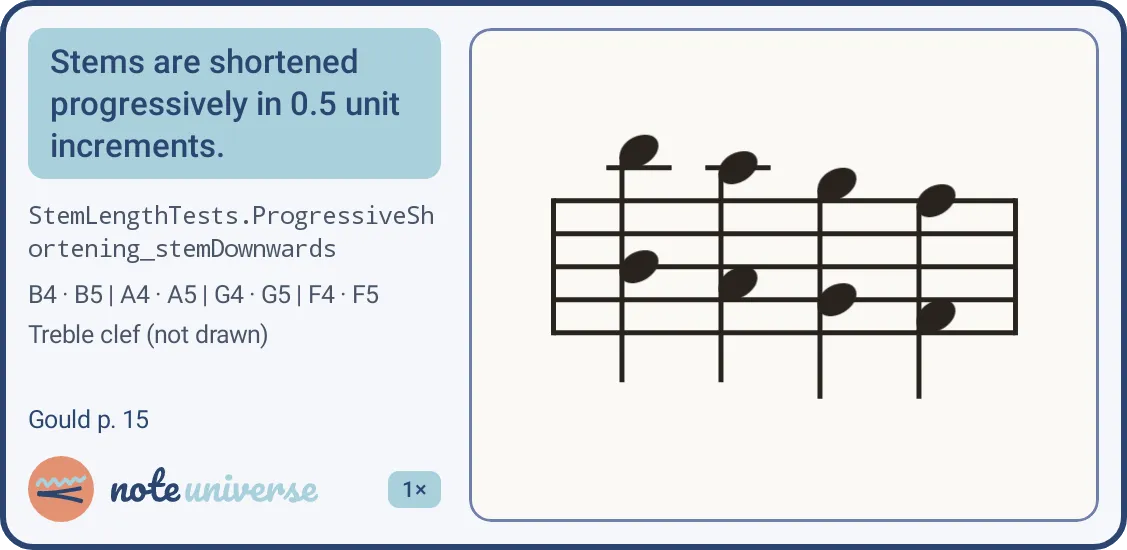
Behold! Screenshot goldens. There are over 200 of these in the app.
Putting it all together
This engraving pipeline now underpins the entire Note Universe app and does a great job at rendering the generated sight reading exercises.
One feature I had not anticipated tackling until much later was importing external sources of music. The standard file format for this is MusicXML. Most music scoring software supports exporting notation in this format.
My motivation for this wasn’t to allow users to import arbitrary scores - they can already use something like MuseScore for that. I had a different purpose in mind. I figured that at some point, LLMs would be sophisticated enough that they could generate valid and perhaps even musically interesting MusicXML. If I could build a pipeline to import MusicXML, I could use this as a means of generating more authentic sight reading exercises.
The release of Claude Fable a few months ago pushed my curiosity too far and I decided to try to tackle this. Building the MusicXML parser itself was a two step change. First I had to refactor the engraver API to ensure it was sufficiently general that it could be manipulated by both the Note Universe exercise generators as well as a MusicXML importer. My original design for this API was reasonably solid, so thankfully this didn’t require significant work. The second phase was to write the MusicXML parser and connect it to the engraver API. This was actually quite straightforward, and one of the requirements of the engraver API refactor was to ensure it would lend itself naturally to walking a MusicXML file.
As an E2E test I asked Fable to compose a short waltz in G Major. Seeing this displayed on a tablet was truly satisfying. Here’s a recording of me sight reading it:
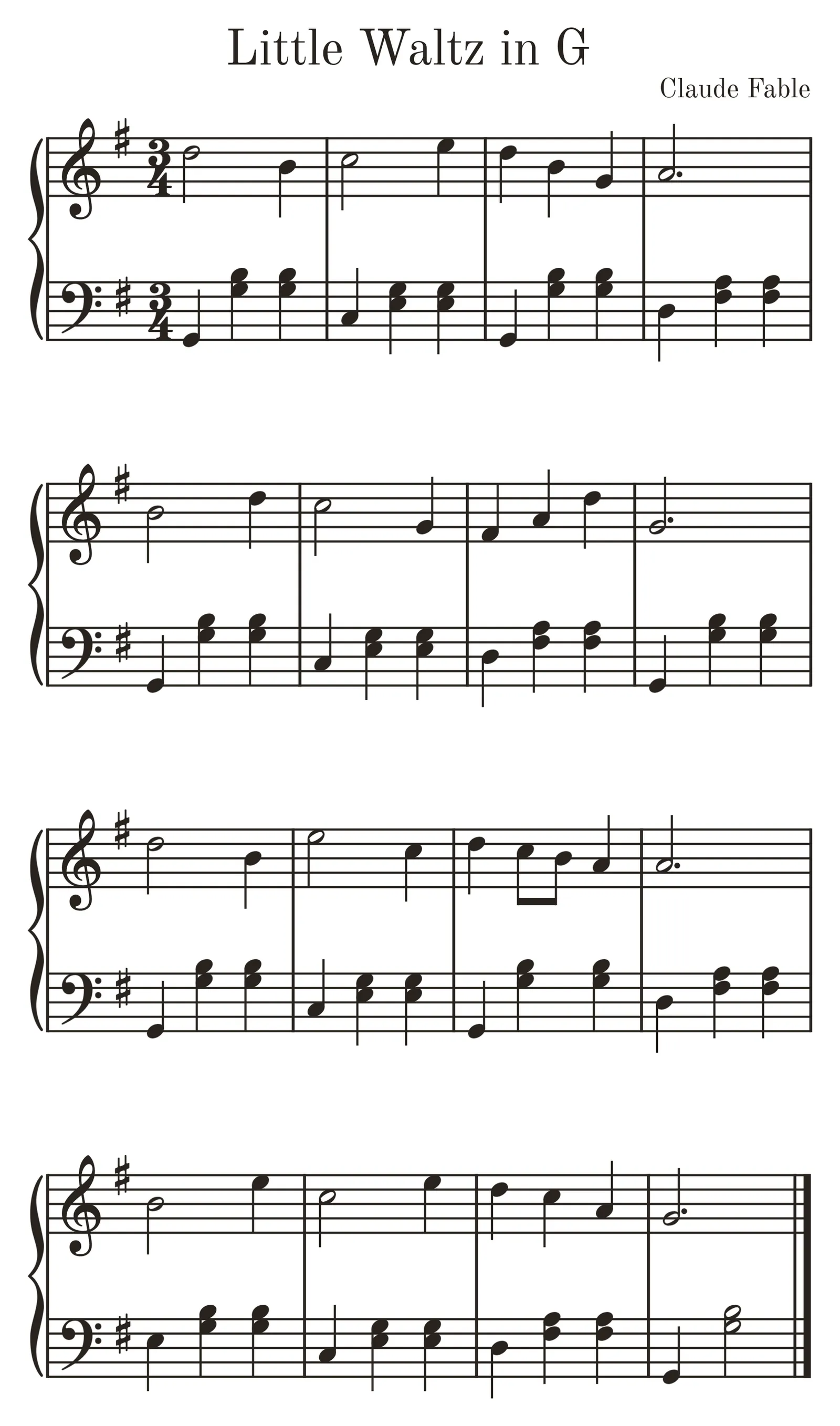
Little Waltz in G, composed by Claude Fable.
The app is now live on the Play Store and is coming to iOS soon. I think it currently does a good job of quickly getting a beginner up to speed, and is a useful practice aid for an intermediate player. There’s various features that will be landing in the next few weeks as I iterate further. The feature I’m most excited about is the MusicXML based system I just described that will bring a plethora of fun little sight reading pieces to the app, to complement the procedurally generated sight reading exercises.
I’ll be posting more articles like this, so please sign up to the newsletter if you want to get notified about them.